
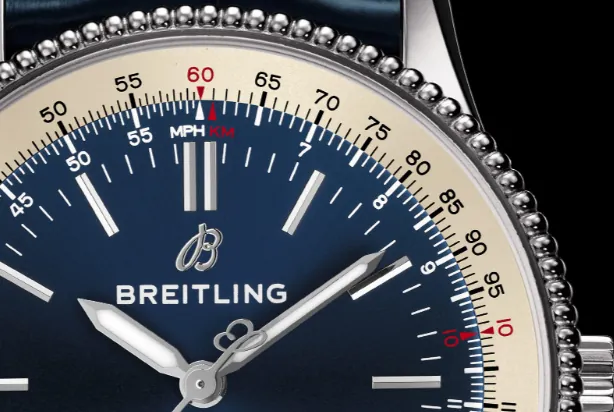
How to Read Breitling’s Slide Rule Bezel on Navitimer Models
The Breitling Navitimer’s rotating slide rule bezel is the watch’s most legendary feature, originally engineered as a portable flight computer for professional pilots. Every premium Navitimer replica faithfully recreates this dual-scale circular slide rule, but most new owners only use the watch’s chronograph and ignore its full calculating power. This beginner-friendly guide breaks down the slide rule’s core structure, step-by-step math operations, aviation calculations, and daily practical uses, tailored specifically for your Breitling Navitimer replica.
Basic Structure: Fixed Inner Scale vs Rotating Outer Bezel Scale
Before any calculation, learn the two core components of the Navitimer slide rule:
1. Fixed Inner Scale (Dial Edge): Printed around the perimeter of the watch dial, stationary and never moves. It features a critical red marker labeled “10” — this is the unit index, the starting point for nearly all math problems. Special colored markers STAT (statute miles), KM (kilometers), and NAUT (nautical miles) are also printed here for unit conversion.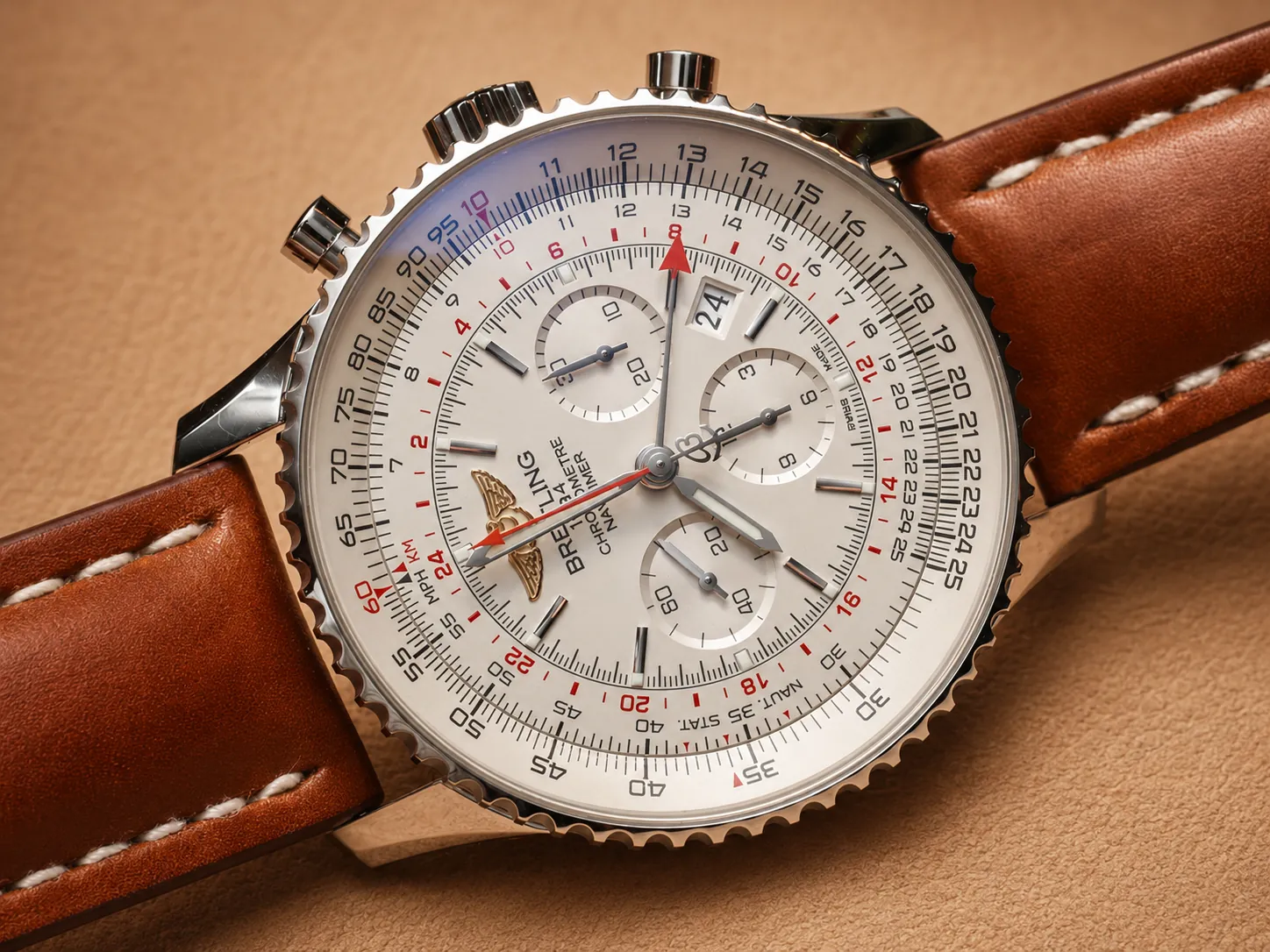
2. Movable Outer Scale (Rotating Bezel): The ridged ring surrounding the dial that spins clockwise or counterclockwise. This scale aligns its numbers against the fixed inner dial scale to complete logarithmic calculations.
All numbers on both scales represent flexible values — the digit “12” can stand for 1.2, 12, 120, or 1200 depending on your calculation context, no decimal points are printed on the slide rule itself.
Core Operation 1: Multiplication with the Unit Index (Red “10” Marker)
The red “10” unit index on the fixed inner dial is your anchor for all multiplication tasks, following this simple 3-step process:
Step 1: Rotate the outer bezel to line up your multiplier number on the outer scale directly across from the red “10” on the fixed inner dial.
Step 2: Locate your multiplicand number on the stationary inner dial scale.
Step 3: Read the matching number on the outer bezel scale aligned with that inner digit — this is your final product.
Practical Example: 7 × 12 = 84
Align outer scale “12” with inner red “10”. Find “7” on the inner dial; the outer scale opposite reads “84”, your answer.
This method works for everyday math: calculating grocery totals, travel distance, fuel volume, and hourly rates.
Core Operation 2: Division Using the Same Red “10” Index
Division reverses the multiplication workflow, still using the red unit index as your final answer marker:
Step 1: Rotate the outer bezel to set your dividend (total number) on the outer scale across from your divisor on the fixed inner dial.
Step 2: Look directly above the inner dial’s red “10” marker.
Step 3: The number printed on the outer bezel at this position is your division result.
Practical Example: 120 ÷ 4 = 30
Align outer “12” (representing 120) with inner “4” (representing 4). The outer scale across from inner red “10” reads “30”.
Aviation & Travel Calculation 1: Ground Speed (MPH / KPH)
The slide rule’s original purpose was flight speed calculations, and it works equally well for road trip speed estimates:
Scenario: You travel 104 miles in 35 minutes; find your average speed.
1. Spin the outer bezel to line outer “104” against inner “35” (minutes).
2. Check the number on the outer scale aligned with the 12 o’clock hour index arrow on the dial — this reading equals miles per hour.
For car trips, swap miles for kilometers and follow the identical steps to calculate KPH.
Aviation & Travel Calculation 2: Time Required for a Trip
Use this formula to find how long a journey will take at a set speed:
Scenario: How long to drive 486 miles at 156 MPH?
1. Align outer scale “156” with the fixed hour index arrow at 12 o’clock.
2. Locate “486” on the outer bezel scale.
3. Read the matching number on the inner dial — this value equals total travel minutes (convert to hours by dividing by 60).
Aviation & Travel Calculation 3: Fuel Consumption Estimation
Perfect for drivers and pilots to calculate total fuel needed for a route:
Step 1: Use multiplication to calculate total flight/drive time.
Step 2: Align your hourly fuel burn rate on the outer scale against inner red “10”.
Step 3: Match total travel hours on the inner dial, then read total fuel volume from the outer scale.
Unit Conversion: Miles, Kilometers & Nautical Miles
Color-coded STAT, KM, and NAUT markers on the fixed inner dial eliminate manual conversion math:
Example: Convert 1800 statute miles to kilometers and nautical miles.
1. Rotate outer bezel “18” (1800) to line up with inner STAT marker (statute miles).
2. Check outer scale number across from inner KM marker = kilometer total.
3. Check outer scale number across from inner NAUT marker = nautical mile total.
This conversion works for road travel, boating, and aviation planning without extra tools.
Daily Non-Aviation Uses for the Navitimer Slide Rule Bezel
You don’t need to fly a plane to utilize the slide rule on your Navitimer replica — it solves common everyday problems:
- Currency exchange rate multiplication/division
- Discount percentage calculations (original price × discount rate)
- Cooking recipe ingredient scaling
- Distance & speed estimates for running, cycling, and road trips
- Hourly wage and total work pay math
Care Tips for Your Navitimer Replica Slide Rule Bezel
The printed logarithmic scales on your replica’s bezel and dial are delicate, follow these rules to preserve clear markings long-term:
1. Rotate the bezel gently with fingertips; avoid gripping and twisting with sharp metal objects that scratch printed numbers.
2. After swimming, beach visits, or sweaty outdoor wear, wipe the bezel gap with a soft microfiber cloth to remove salt, chlorine, and skin oil that fade scale printing.
3. Do not apply alcohol, perfume, or harsh cleaners directly to the slide rule surface — chemicals erase fine printed text over time.
4. Avoid dropping the watch onto hard surfaces; impact can misalign the rotating bezel and create stiff rotation.
Common Beginner Mistakes to Avoid
1. Mixing up fixed inner dial scale and movable outer bezel scale: Always confirm which part stays stationary before aligning numbers.
2. Ignoring the flexible number values: Remember “15” can represent 15, 150, or 1500 based on your math problem.
3. Forcing the bezel rotation: Premium Navitimer replica bezels spin smoothly; resistance means dirt buildup, not a broken mechanism.
4. Overlooking the red “10” unit index: Nearly all core calculations rely on this marker as your reference point.
Final Thoughts
The slide rule bezel is more than decorative branding on your Breitling Navitimer replica — it is a fully functional vintage flight computer packed into your watch case. Mastering basic multiplication, division, speed, distance, and unit conversion unlocks the full aviation spirit that makes the Navitimer an iconic luxury tool watch.
With simple daily practice, you can replace phone calculator apps with your watch’s built-in slide rule for travel, driving, and everyday math. If you struggle with any calculation workflow or need clearer step-by-step guidance for your Navitimer replica, reach out to our customer service team. Our specialists will walk you through slide rule operations and answer all your functional questions.
